How to Use the Focus Engine for Deep Work Sessions
A complete guide to starting timed deep work sessions, choosing Pomodoro vs Deep Work vs Flow State, activating Shield Mode, and auto-logging actual hours against tasks.
Section Protocoltitle: "How to Use the Focus Engine for Deep Work Sessions"
description: "Master the Focus Engine — JeevanAxis's structured deep work environment — to auto-log actual hours, eliminate distractions with Shield Mode, and compound your daily output into long-term extraordinary performance."
category: "Plan Module"
publishedAt: "2026-05-29"
readingTime: "12 min"
tags: ["focus", "deep work", "sessions", "shield mode", "productivity"]
Operational Directive
The Focus Engine is JeevanAxis's structured deep work environment — a session timer that wraps any task in a distraction-reduced window, auto-logs actual hours, and feeds your performance analytics. This guide teaches you how to start sessions, choose the right duration, use Shield Mode effectively, and build the daily Focus Engine habit that compounds into extraordinary long-term output.

Section ProtocolWhat Is the Focus Engine?
Most productivity tools ask you to estimate time. The Focus Engine does the opposite — it measures time with discipline and honesty. When you start a Focus Engine session, JeevanAxis wraps your selected task in a structured, timed container. The countdown clock runs. Distractions are suppressed. When the session ends, the actual minutes are automatically written into your task record and fed to your performance analytics.
This is not just a Pomodoro timer. It is an integrated work protocol that connects intent (task selection) to execution (timed session) to insight (analytics). The Focus Engine is how JeevanAxis closes the loop between planning and doing.
TACWhy Timed, Isolated Sessions Outperform Open-Ended Work
Open-ended work — the "I'll just work on this until it's done" approach — has a fundamental problem: without a boundary, your brain never fully commits. Parkinson's Law states that work expands to fill the time available. Open-ended sessions invite distraction, context-switching, and the comfortable illusion of productivity without depth.
Timed sessions create three psychological conditions that open-ended work cannot:
- ▶Urgency: A countdown activates your brain's threat response — not in a harmful way, but in the focused, alert way that athletes call "being in the zone." You know the clock is running, so you work.
- ▶Commitment: When you hit Start, you make a micro-commitment to one task for a defined period. This commitment reduces decision fatigue mid-session — you're not wondering what to work on, you're doing it.
- ▶Measurability: Because the session has a defined start and end, your actual output is measurable. This turns your work history into data, and data drives improvement.
Research from Cal Newport, Anders Ericsson, and the flow science of Mihaly Csikszentmihalyi converges on one insight: deep work produces exponentially better output than shallow, interrupted work — and deep work requires protected time containers. The Focus Engine provides exactly that.
Section ProtocolThe Three Session Types
JeevanAxis offers three session durations, each designed for a different cognitive demand level and work context. Choosing the right session type is the first decision you make after selecting your task.
TACPomodoro — 25 Minutes
Best for: Maintenance tasks, email processing, quick reviews, low-complexity writing, administrative work, tasks you've been avoiding.
The Pomodoro technique, developed by Francesco Cirillo in the 1980s, remains the most accessible entry point to structured work. Twenty-five minutes is short enough to overcome resistance — you can always do anything for 25 minutes — but long enough to produce meaningful output on focused tasks.
Use Pomodoro sessions when:
- ▶You have less than 90 minutes available before a meeting or obligation
- ▶The task is clear and well-defined (you know exactly what "done" looks like)
- ▶You're in a lower-energy period of the day (post-lunch, late afternoon)
- ▶You're returning to a task after a break and need a warm-up session
TACDeep Work — 50 Minutes
Best for: Writing, coding, analysis, design, complex problem-solving, learning new material.
Fifty minutes is the sweet spot for cognitively demanding work. It's long enough to reach a state of genuine focus (typically requiring 15-20 minutes of warm-up), while short enough to maintain intensity throughout. The 10-minute break that follows helps your brain consolidate what it processed.
Use Deep Work sessions when:
- ▶You have 60-90 minutes of protected time available
- ▶The task requires sustained reasoning, creative thinking, or skill application
- ▶You are in your peak energy window (typically morning for most people)
- ▶You want to make serious progress on a project milestone
TACFlow State — 90 Minutes
Best for: Major creative work, deep engineering sessions, writing first drafts, architectural thinking, research immersion.
Ninety minutes aligns with the human ultradian rhythm — the 90-minute cycles your brain naturally moves through between higher and lower alertness. A 90-minute Flow State session, when timed correctly, can coincide with your brain's natural peak, producing work of exceptional depth and quality.
Use Flow State sessions when:
- ▶You have 2+ hours of protected, interruption-free time
- ▶The task is your most important creative or intellectual work
- ▶You're working on something that requires sustained momentum — stopping mid-session would cost significant re-entry time
- ▶You have a pre-session ritual that reliably gets you into focus (journaling, exercise, a specific playlist)
Section ProtocolHow to Start a Focus Engine Session
Starting a session is a four-step process that takes less than 30 seconds once you know the sequence.
TACStep 1: Select Your Task
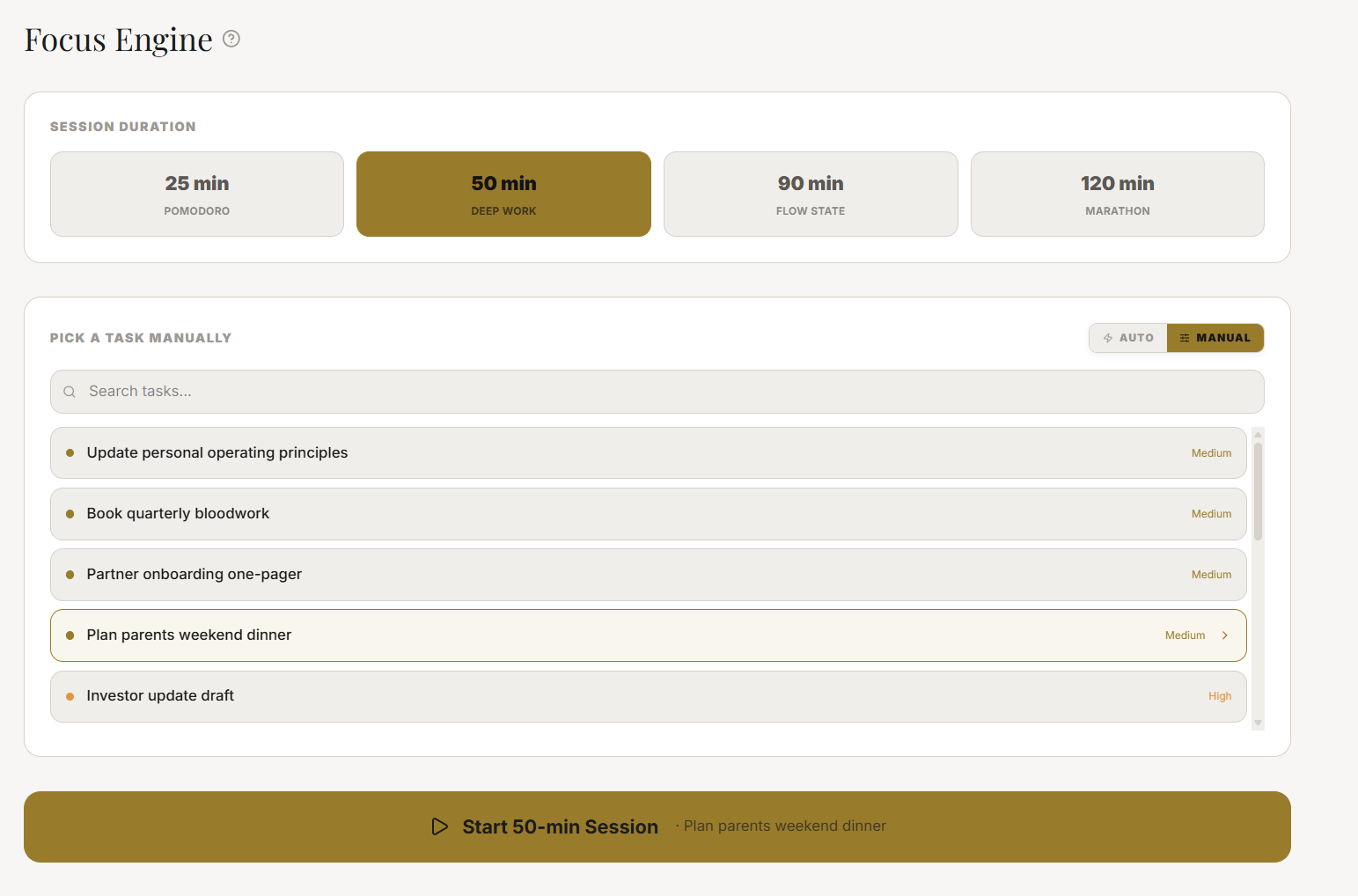
Navigate to the Focus Engine via Plan → Focus Engine or from the Today Dashboard (more on this below). The first screen shows your active tasks. Select the task you intend to work on. You can only have one active task per session — this is intentional. The Focus Engine does not allow multitasking.
If no tasks are showing, it means you have no active tasks in your Plan. You'll need to create tasks first via Plan → Tasks before using the Focus Engine.
TACStep 2: Choose Your Duration
Once a task is selected, choose your session type: Pomodoro (25 min), Deep Work (50 min), or Flow State (90 min). Refer to the decision tree above if you're unsure. The UI presents all three as large, tappable buttons with a brief description of each.
TACStep 3: Start the Session
Press Start Session. The Focus Engine enters its Active state. The countdown timer appears — a circular progress ring that depletes clockwise. The task name is displayed prominently in the center. Your session has begun.
TACStep 4: Activate Shield Mode (Recommended)
Immediately after starting your session, you'll see the Shield Mode toggle. Activating it is the single most impactful step you can take to protect session quality. (See the full Shield Mode section below.)
Section ProtocolShield Mode: Full Distraction Elimination
Shield Mode is the Focus Engine's most powerful feature and the most misunderstood. Many users start sessions but never activate Shield Mode — and then wonder why the session didn't feel as focused as expected.
TACWhat Shield Mode Does
When Shield Mode is active:
- ▶The JeevanAxis UI dims — all navigation, notifications, and non-session UI elements are hidden. The only visible elements are the countdown timer, the task name, and a single "I need to stop" exit button.
- ▶Session notifications are suppressed — no badges, no banners, no interruptions from within the app.
- ▶The screen is locked into the session view — accidental taps on navigation elements do nothing.
- ▶The shield icon glows — a subtle animated pulse reminds you that you're protected.
What Shield Mode does not do: it cannot suppress native OS notifications on your device (phone calls, push notifications from other apps). For full distraction elimination, pair Shield Mode with your device's native Do Not Disturb mode.
TACHow to Activate Shield Mode
Immediately after pressing Start Session, tap the Shield icon in the upper right corner of the session screen. The UI will transition into Shield Mode within 300ms. You'll see the background dim and all non-essential UI elements disappear.
You can also set Shield Mode to activate automatically for certain session types. Go to Settings → Focus Engine → Auto-Shield and toggle it on for Deep Work and Flow State sessions.
TACWhat Changes in the UI During Shield Mode
| Element | Normal Session | Shield Mode | |---|---|---| | Navigation bar | Visible | Hidden | | Task list sidebar | Visible | Hidden | | Notification badges | Show | Suppressed | | Timer display | Standard | Full-screen | | Background | App theme | Darkened overlay | | Exit option | Multiple paths | Single "I need to stop" button |
Section ProtocolBreak Protocols: The Science of Recovery
The break after a Focus Engine session is not optional — it is part of the protocol. Your brain consolidates what it processed during the session in the minutes immediately following. Skipping breaks to "keep momentum" is one of the most common Focus Engine mistakes (see Trap 2 below).
TACPomodoro Break — 5 Minutes
After a 25-minute Pomodoro session:
- ▶Stand up, walk, stretch
- ▶Drink water
- ▶Do not check social media or email — this immediately hijacks your attentional system
- ▶Do not start a new task mentally — let the previous session's work settle
TACDeep Work Break — 10 Minutes
After a 50-minute Deep Work session:
- ▶Step away from your screen completely
- ▶Take a short walk (even 5 minutes of walking dramatically improves subsequent cognitive performance)
- ▶Breathe, hydrate, let your mind wander without a destination
- ▶Optionally, jot a quick note about where you left off so re-entry is instant
TACFlow State Break — 20 Minutes
After a 90-minute Flow State session:
- ▶Your brain has done significant heavy lifting. Honor the recovery.
- ▶Take a full 20 minutes: walk, nap (a brief 10-minute nap is scientifically validated for cognitive recovery), eat, or simply rest
- ▶Avoid decisions during the break — your prefrontal cortex needs recovery time
- ▶The 20-minute break is what allows a second Flow State session later in the day, if your schedule permits
Section ProtocolAuto-Logging: How Your Hours Are Recorded
One of the most valuable features of the Focus Engine is auto-logging — the automatic recording of your actual work time against tasks, without any manual input.
TACHow It Works
When you start a session, JeevanAxis begins a timer attached to:
- ▶The specific task you selected
- ▶The project that task belongs to
- ▶Your user account's session history
When the session completes (or when you stop it early), JeevanAxis writes the actual elapsed time to the task record. If you started a 50-minute Deep Work session and stopped it at 37 minutes, 37 minutes are logged — not 50.
TACWhat Auto-Logging Feeds
The logged time propagates through three layers of the JeevanAxis analytics system:
- ▶Task Record: The task's "Actual Hours" field is updated. You can see this when viewing task details.
- ▶Project Analytics: The project's total logged hours accumulate. This feeds the Effort vs. Estimate comparison in your project analytics view.
- ▶Momentum Score: Your daily and weekly Momentum Score is influenced by session count, total logged hours, and session completion rate. Completing sessions (vs. abandoning them) produces better Momentum Score impact.
TACViewing Session History
To see all past sessions:
- ▶Navigate to Plan → Focus Engine
- ▶Tap History in the upper navigation
- ▶You'll see a chronological list of every session with: date, task name, session type, planned duration, actual duration, and completion status
Session history is also accessible via your Weekly War Room review, where it surfaces as the "Sessions Completed" metric for the week.
Section ProtocolUsing the Focus Engine from the Today Dashboard
You do not need to navigate to the Plan Module to start a Focus Engine session. The Today Dashboard — your JeevanAxis home screen — provides a direct Focus Engine entry point.
TACHow to Launch from Today Dashboard
- ▶On the Today Dashboard, scroll to the Today's Focus section
- ▶Your top-priority task for today is pre-selected (based on your weekly priorities and due dates)
- ▶Tap Start Focus Session directly from the Today Dashboard card
- ▶Choose your duration and start
This frictionless entry point is intentional. The fewer clicks between "I'm ready to work" and "session has started," the more likely you are to actually start. The Today Dashboard launch path removes 2-3 navigation steps compared to the Plan Module path.
TACToday Dashboard + Focus Engine Integration
When a session is active, the Today Dashboard updates in real time:
- ▶The active task card pulses with a subtle animation
- ▶A miniaturized session timer appears at the top of the dashboard
- ▶Your Momentum Score badge shows a "Live Session" indicator
This means you can use the Focus Engine while keeping Today Dashboard as your ambient workspace view — checking your day's structure without leaving the session context.
Section ProtocolBuilding a Daily Session Cadence
The Focus Engine becomes exponentially more powerful when used as a consistent daily practice rather than an occasional tool. The compounding effect of focused sessions — each one building on the last — is what separates extraordinary performers from merely busy ones.
TACThe Recommended Daily Structure
For most knowledge workers, 2-3 sessions per day is the optimal cadence:
| Time of Day | Session Recommendation | Rationale | |---|---|---| | Morning (8-11am) | Flow State 90min or Deep Work 50min | Peak cognitive energy for most people | | Midday (12-2pm) | Pomodoro 25min | Post-lunch energy dip — use for admin or light tasks | | Afternoon (3-5pm) | Deep Work 50min | Second energy peak for many people |
Why not more than 3 sessions?
Deliberate, high-intensity focus is neurologically expensive. Studies of elite performers — from chess grandmasters to concert musicians — consistently show that the maximum sustainable deep work per day is approximately 4-5 hours. Three sessions (25 + 50 + 90 = 165 minutes, or 2.75 hours) is aggressive but sustainable. It leaves room for meetings, communication, planning, and recovery without burning out your attentional reserves.
TACBuilding the Habit
The Focus Engine habit follows the standard behavioral loop: cue → routine → reward.
- ▶Cue: Schedule your first session as a calendar block. "10:00am — Focus Engine, Project X" is a cue your brain will start anticipating.
- ▶Routine: The session itself — task selected, timer running, Shield Mode active.
- ▶Reward: JeevanAxis provides an explicit reward at session completion: a gentle animation, a logged entry, and an incremental Momentum Score bump. These small, immediate rewards are what make the habit sticky.
After 21 days of consistent Focus Engine use (any streak of 2+ sessions per day), you'll notice that starting a session becomes automatic — your brain begins to associate the Focus Engine UI with the feeling of going deep.
⚠Common Traps
✓Focus Engine Session Quality Checklist
Reflection Prompts
Executive Summary
▸The Focus Engine is the execution layer of JeevanAxis — the place where plans become real hours, real progress, and real momentum.
▸By choosing the right session type for your energy and task complexity, activating Shield Mode to eliminate distraction, following the prescribed break protocols, and building a consistent 2-3 session daily cadence, you transform the Focus Engine from a timer into a performance system.
▸Auto-logging connects every session to your analytics, making your effort visible and your improvement measurable over time.
▸The compounding effect of disciplined daily sessions — weeks and months of logged, focused hours — is what separates JeevanAxis users who experience extraordinary output from those who are simply busy.
Intelligence Pipeline
Run Your Weekly War Room →
Learn the 5-step Sunday review protocol that converts your Focus Engine session history into strategic clarity for the next week — and prevents the compound chaos of skipped reviews.
Build Your Personal Knowledge Base with Notes →
Discover how to link notes directly to your Focus Engine tasks, creating persistent project context that survives across sessions and makes re-entry into deep work instant.
Understand Your Momentum Score →
Dive into how the Focus Engine's auto-logged sessions feed your Momentum Score, and learn to read your analytics to optimize your session cadence for peak long-term performance.
Connected Intelligence
Ready to Deploy Your Life OS?
Experience the full power of integrated intelligence. Stop managing apps and start operating your life.
Launch Command Center