Return to Intelligence Bank
Intelligence Brief
ID: HOW-TO-USE-TASK-MANAGEMENT-JEEVANAXIS

How to Use Task Management in JeevanAxis

Master the priority-driven task system — P1–P4 classification, Eisenhower Matrix views, goal linkage, overcommitment detection, and the 5-stage task lifecycle.

Operation ZonePLAN MODULE
Read Duration10 MIN
TASKSPRIORITIZATIONEISENHOWEREXECUTION

How to Use Task Management in JeevanAxis

Operational Directive

Task management in JeevanAxis is not a to-do list — it is a priority-driven execution system where every task carries urgency and importance signals, links to a project or goal, and feeds a live performance score. This guide teaches you to create, prioritize, organize, and execute tasks in a way that ensures your daily effort always moves your most important outcomes forward.

Section Protocol
The Problem with Simple To-Do Lists

Traditional to-do lists have a structural flaw: they treat all tasks as equal. Whether you are writing a quarterly report or picking up groceries, both items occupy the same visual weight on a flat list. The result is that humans naturally gravitate toward the easiest or most recently added items — not the most strategically important ones.

JeevanAxis task management solves this through three mechanisms:

  1. Priority signals — P1 through P4 classify every task by urgency and importance
  2. Goal and Project linkage — tasks are contextually connected to their strategic purpose
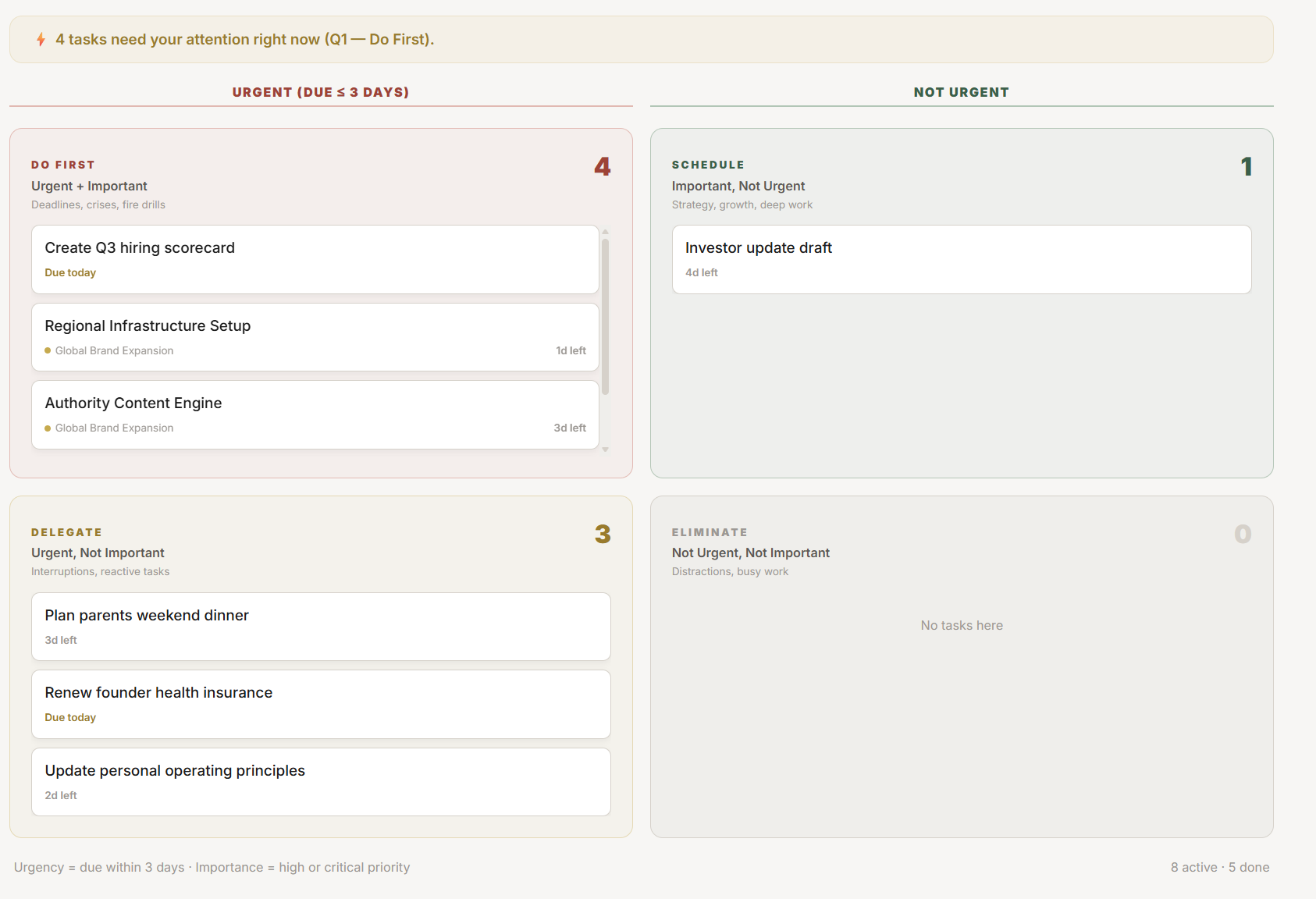
  3. Eisenhower Matrix view — all tasks are automatically placed in a 2×2 grid showing the urgency × importance distribution at a glance
Tactical Logic Visualization
SYNTHESIZING DIAGRAM…
//Every task moves through a 5-stage lifecycle — capture, process, schedule, execute, review. Skipping any stage reduces system effectiveness.

Section Protocol
Creating a Task — Every Field Explained

Navigate to Plan → Tasks and press the + New Task button, or use ⌘K → "new task" from anywhere.

Tactical Logic Visualization
SYNTHESIZING DIAGRAM…
//Title and Priority are the minimum required fields. Due Date, Project, and Goal links make tasks far more powerful.

TACSetting Priority Correctly

Priority is the most important field because it determines:

  • Which Eisenhower quadrant the task appears in
  • Whether it surfaces on your Today Dashboard Core Priorities
  • How it factors into your Momentum Score calculation

P1 (Critical — Red): A specific, hard consequence if not completed by the due date. Examples: client deliverable, medical appointment, tax filing deadline, interview.

P2 (Important — Green): Advances a strategic goal but has no external deadline forcing action today. Examples: writing a chapter, building a feature, reading a key book, gym session.

P3 (Moderate — Gold): Needs to happen but primarily driven by someone else's timeline. Examples: replying to a non-urgent email, scheduling a meeting, updating a document.

P4 (Low — Grey): Would be nice to do but has no consequence if deferred. Examples: organizing files, updating profile photos, exploratory research.

Section Protocol
Views: How to See Your Tasks

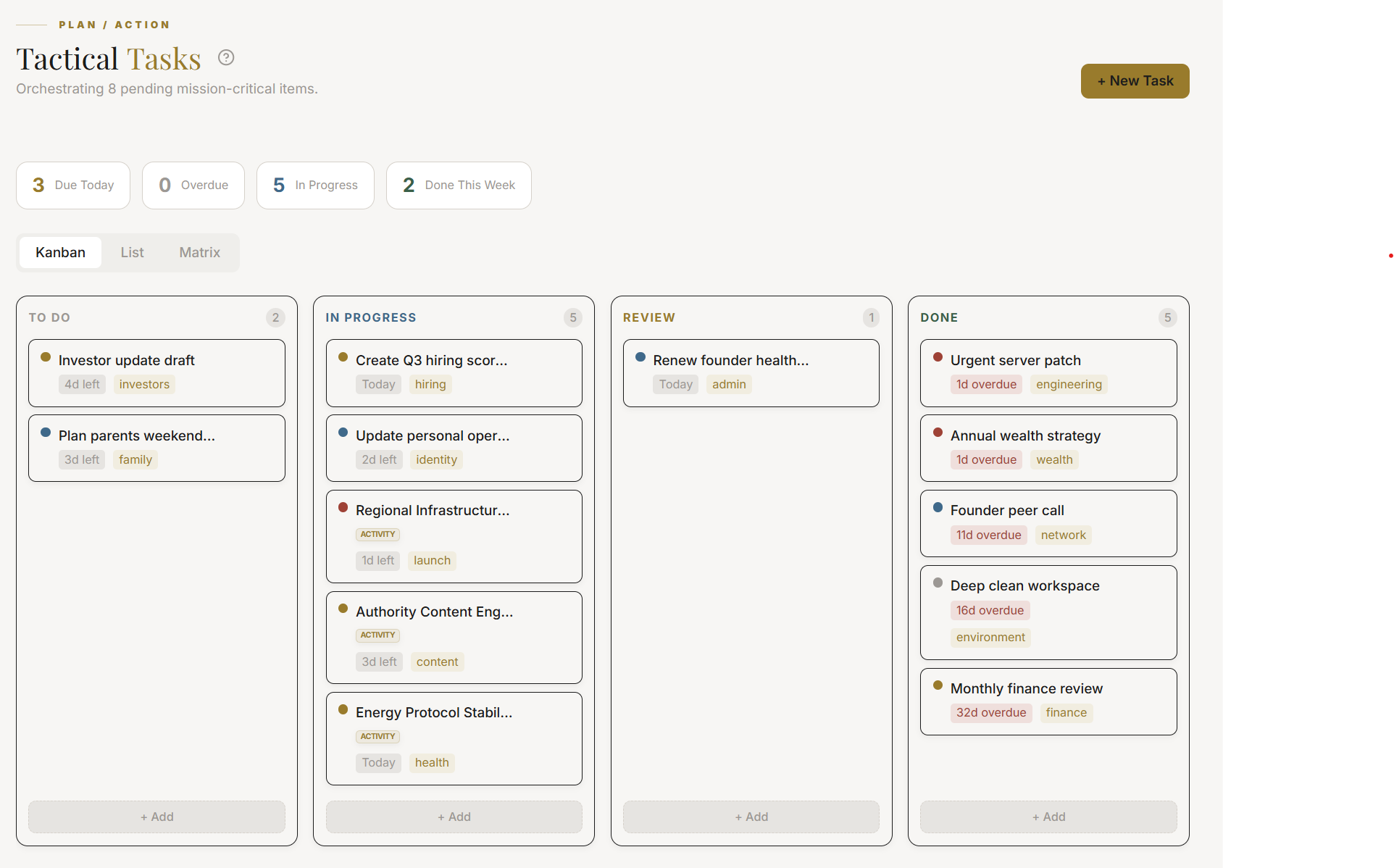
The Plan Module offers four task views, each optimized for a different thinking mode:

Tactical Logic Visualization
SYNTHESIZING DIAGRAM…
//Four views serve four different cognitive modes — switch between them based on what you are trying to accomplish

When to use each view:

  • Eisenhower Matrix — every morning to confirm your Q1 priorities before starting work
  • List View — when processing the Smart Inbox or doing a bulk priority review
  • Calendar View — on Sunday during the Weekly War Room when time-blocking next week
  • Kanban Board — when tracking a specific project's task flow through its stages

Section Protocol
Filtering and Sorting Tasks

Use filters to create focused views of your task landscape:

Tactical Logic Visualization
SYNTHESIZING DIAGRAM…
//Combine filters to create targeted views — the Overdue + P1 filter is the most urgent audit you can run on your task system

Section Protocol
Completing and Closing Tasks

When a task is done, mark it complete immediately — do not batch-mark tasks at the end of the day. Each completion triggers:

  1. Momentum Score update — completion rate is recalculated
  2. Project progress bar advance — if the task was linked to a project
  3. Goal milestone check — if completing this task triggers a milestone
  4. Analytics log entry — timestamp and actual duration recorded

If a task needs to be deferred: Use the "Move to Tomorrow" action on the task card. This moves the due date by one day and logs a deferral in the Analytics. A high deferral rate is a signal surfaced by the Intelligence Center.

Section Protocol
The Overcommitment Detection System

Tactical Logic Visualization
SYNTHESIZING DIAGRAM…
//Overcommitment detection warns you before a week collapses — giving you time to defer P3/P4 tasks before Monday

When overcommitment is detected, the system recommends specific tasks to defer — typically the lowest-priority items with the most flexibility in their deadline.

Common Traps

Task Management Setup Checklist

Reflection Prompts

"

Executive Summary

JeevanAxis task management is a priority-driven, goal-linked execution system.

Every task carries a P1–P4 priority signal that drives its Eisenhower Matrix placement and Today Dashboard visibility.

Four views — Matrix, List, Calendar, Kanban — serve different thinking modes.

Tasks become exponentially more powerful when linked to Projects and Goals, feeding the Analytics layer, Goal Progress rings, and Intelligence Center insights.

The Overcommitment Detection system warns before a week collapses.

The correct protocol is: create tasks with context, prioritize ruthlessly, execute via Focus Engine, complete immediately, and audit overdue and unlinked tasks weekly.

Intelligence Pipeline

Ready to Deploy Your Life OS?

Experience the full power of integrated intelligence. Stop managing apps and start operating your life.

Launch Command Center