How to Use the Eisenhower Matrix in JeevanAxis
Master the live 4-quadrant task management system — learn to categorize, prioritize, and execute tasks across DO NOW, SCHEDULE, DELEGATE, and ELIMINATE quadrants.
How to Use the Eisenhower Matrix in JeevanAxis
Operational Directive
The Eisenhower Matrix inside JeevanAxis is not a static 4-quadrant diagram — it is a live, dynamic task management system that categorizes, ranks, and routes your work by urgency and importance simultaneously. This guide shows you exactly how to read, populate, use, and maintain it for maximum daily execution clarity.
Section ProtocolWhy Most Priority Systems Fail
Most to-do lists are prioritized by one dimension — usually urgency. The problem with urgency-only prioritization is that the most urgent tasks are often the least important ones. Responding to someone else's deadline feels urgent. Building your health routine is not urgent today but is critically important over a 90-day horizon.
The result: busy people spend their highest-energy hours on P3 and P4 work while their P2 strategic investments never happen.
The Eisenhower Matrix solves this by forcing a two-dimensional evaluation: urgency AND importance simultaneously. When you see all four quadrants together, the allocation of your attention becomes viscerally obvious.
Section ProtocolAccessing the Eisenhower Matrix in JeevanAxis
The Eisenhower Matrix is accessible in two places:
- ▶Today Dashboard — A compact matrix view embedded in the Core Priorities section
- ▶Plan Module → Tasks — The full-screen expanded matrix with complete CRUD capabilities
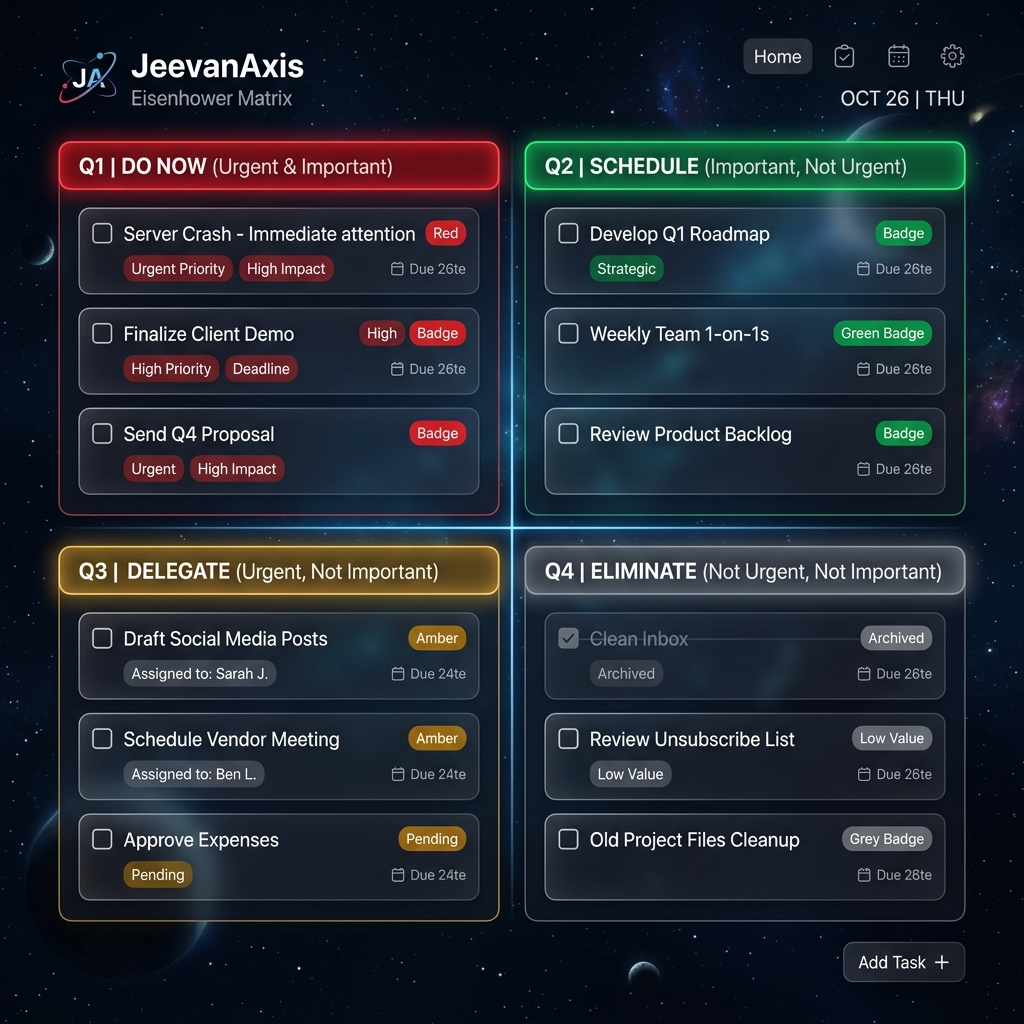
The dashboard matrix gives you an at-a-glance view. The Plan module matrix gives you full control — quick-add per quadrant, drag-and-drop between quadrants, edit, delete, and auto-categorization tools.
Section ProtocolHow Auto-Categorization Works
JeevanAxis can automatically suggest which quadrant a task belongs in based on two data points:
Override at any time: Auto-categorization is a starting suggestion. You can drag any task from one quadrant to another, or edit its placement manually. Your judgment overrides the algorithm.
Section ProtocolThe Four Quadrants — Deep Operational Guide
TACQ1 — DO NOW (Red): Urgent + Important
What belongs here:
- ▶Deliverables with today's or tomorrow's hard deadline
- ▶Tasks where missing the deadline has real consequences (client-facing, financial, health-related)
- ▶Crises or time-sensitive decisions that have emerged today
How to work Q1:
- ▶Q1 is your first block of work every morning — before email, before meetings, before anything else
- ▶Use the Focus Engine from any Q1 task card to start a 25–90 minute timed session
- ▶Aim to clear Q1 by noon wherever possible — afternoon cognitive capacity is typically 20–30% lower than morning capacity
- ▶If Q1 has more than 4–5 items daily on a consistent basis, this is a systemic problem — see the trap card below
TACQ2 — SCHEDULE (Green): Not Urgent + Important
What belongs here:
- ▶Long-term project work with no immediate deadline
- ▶Health habits, exercise planning, relationship investments
- ▶Learning, skill development, strategic thinking
- ▶Planning and systems building
How to work Q2: This is the highest-leverage quadrant. It is where proactive behavior lives — actions that prevent tomorrow's Q1 crises from forming. The problem: because Q2 tasks have no deadline urgency, they are perpetually displaced by Q1 and Q3 items.
The Q2 Protocol:
- ▶Every Sunday during your Weekly War Room, identify 3–5 Q2 items for the coming week
- ▶Book explicit calendar blocks for Q2 work — treat them like meetings you cannot cancel
- ▶Never let Q2 blocks be displaced by Q3 items (see Q3 trap below)
TACQ3 — DELEGATE (Gold): Urgent + Not Important
What belongs here:
- ▶Requests from others that have someone else's deadline attached
- ▶Administrative tasks that feel pressing but do not advance your strategic goals
- ▶Meetings that could be emails
How to work Q3:
- ▶Handle Q3 items in batches — dedicate a 30-minute window in the afternoon, not scattered throughout the day
- ▶If a Q3 item can be delegated to someone else, assign it and remove it from your view
- ▶If you cannot delegate it, time-box it aggressively — set a timer and deliver the minimum acceptable output
TACQ4 — ELIMINATE (Muted): Not Urgent + Not Important
What belongs here:
- ▶Tasks you have been carrying for weeks with no action
- ▶Activities that add no value to any of your life domains
- ▶"Nice to have" items that crowd out your real priorities
How to work Q4: The correct protocol for Q4 is elimination, not scheduling. Delete it. If you cannot delete it, archive it with a 30-day snooze. If it is still in Q4 after 30 days, delete it permanently.
Section ProtocolThe Weekly Quadrant Audit
The key metric to track: What percentage of your completed tasks each week were Q1 vs. Q2?
- ▶Healthy distribution: ~30% Q1, ~50% Q2, ~15% Q3, ~5% Q4
- ▶Crisis mode (to address): 70%+ Q1 — you are operating entirely reactively
- ▶Stagnation mode (to address): 20% Q1, 10% Q2 — you are clearing busywork but not building
Section ProtocolMoving Tasks Between Quadrants
In the Plan module, you can move tasks between quadrants two ways:
Important: Moving a task from Q1 to Q3 or Q4 should be a conscious, deliberate decision. Unconscious demotion of Q1 tasks to avoid doing them is one of the most common self-sabotage patterns in task management.
⚠Common Traps
✓Eisenhower Matrix Setup and Usage Checklist
Reflection Prompts
Executive Summary
▸The JeevanAxis Eisenhower Matrix is a live, four-quadrant task management system built on urgency × importance classification.
▸Q1 (urgent + important) gets your first and best cognitive energy every day.
▸Q2 (important, not urgent) is where strategic growth happens and must be actively protected with calendar blocks.
▸Q3 (urgent, not important) should be batched and minimized.
▸Q4 (neither urgent nor important) should be deleted.
▸The weekly audit of your quadrant distribution reveals whether you are managing time proactively or reactively.
Intelligence Pipeline
Open Your Eisenhower Matrix →
Review your current task distribution and reassign quadrants based on today's priorities.
How to Use Task Management in JeevanAxis →
A complete guide to creating, organizing, and executing tasks in the Plan module.
How to Run Your Weekly War Room Review →
The structured 5-step Sunday review that keeps your matrix healthy week over week.
Connected Intelligence
Ready to Deploy Your Life OS?
Experience the full power of integrated intelligence. Stop managing apps and start operating your life.
Launch Command Center