The Tools Module Complete Guide: Your Utility Belt
A comprehensive guide to the standalone utilities in JeevanAxis, including the Knowledge Base, Checklists, and AI Assistant.
The Tools Module Complete Guide: Your Utility Belt
Operational Directive
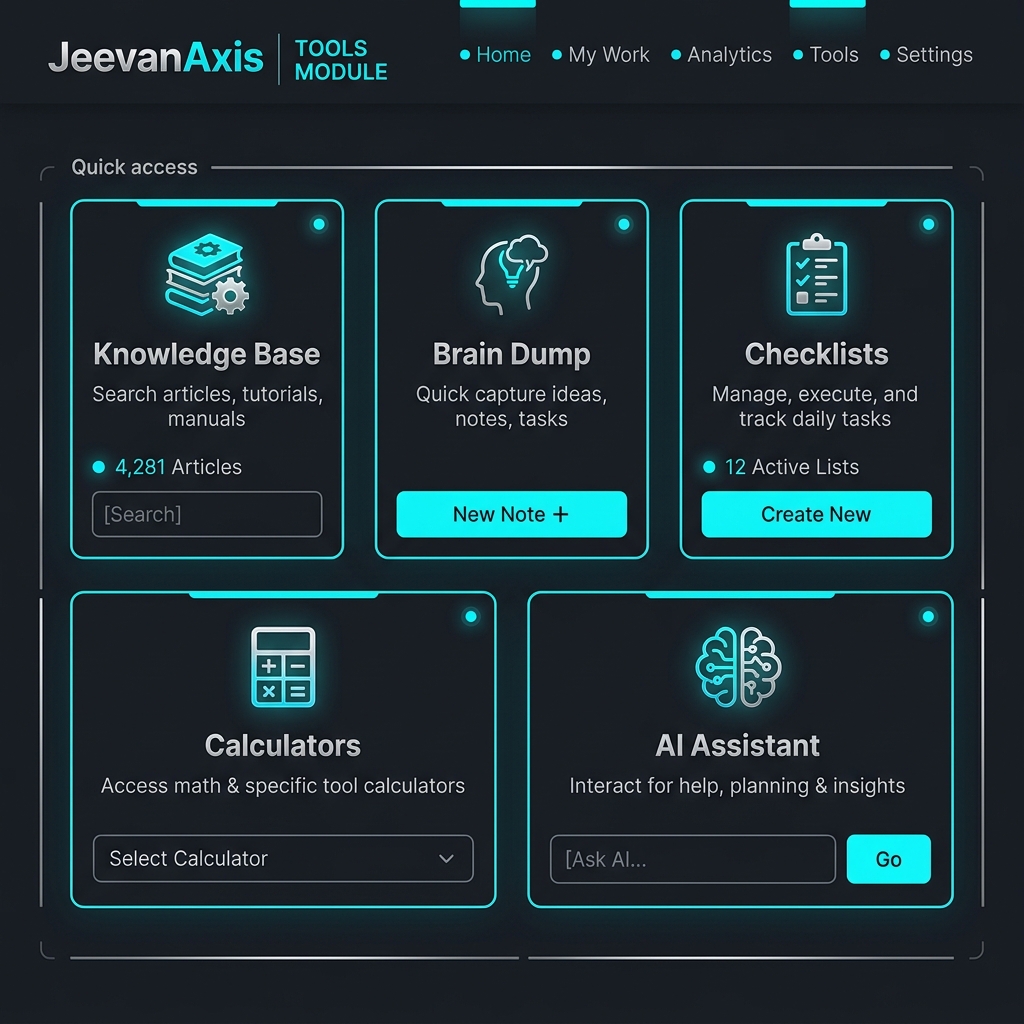
The Tools Module prevents context switching by integrating essential utilities directly into your Life OS. This guide provides an overview of the Knowledge Base, Brain Dump, Checklists, and AI Assistant.
Section ProtocolThe Cost of Context Switching
In the modern digital environment, attention is the most scarce and valuable resource. Every time you switch between different applications—from your task manager to your notes app, from your financial tracker to a standalone checklist tool—you incur a cognitive penalty.
This penalty manifests as a loss of focus, decreased productivity, and an increased likelihood of distraction. The JeevanAxis Tools Module is engineered specifically to eliminate this friction.
By centralizing essential utilities within your primary Life OS, it creates a seamless, unified workspace where your workflow remains uninterrupted.
The architectural philosophy behind the Tools Module is simple: utility should be omnipresent but non-intrusive.
These tools are designed to serve as the supporting infrastructure for your higher-level objectives managed in the Plan, Grow, Transform, and Finance modules.
They are the background processes that keep the main system running efficiently.
When you need to capture a fleeting thought, reference a complex concept, or execute a multi-step procedure, the Tools Module provides the necessary capability without forcing you to break your current context.
Section ProtocolArchitectural Overview
The Tools Module is composed of four distinct but interrelated utilities. Each serves a specific cognitive function.
- ▶
The Knowledge Base (Zettelkasten): This is your long-term memory externalized. It is designed not just for storage, but for the synthesis of ideas. Utilizing bidirectional linking, it allows you to construct a personal wiki where concepts interconnect and compound over time. It is the repository for your research, your insights, and your accumulated wisdom.
- ▶
The Brain Dump: This is your cognitive RAM. It is built for speed and zero-friction capture. When an idea, a task, or a random piece of information enters your mind, the Brain Dump is where it goes immediately. It separates the act of capturing information from the act of processing it, ensuring that you can maintain your flow state without losing valuable thoughts.
- ▶
Checklists: These are your standard operating procedures. They enforce consistency and reduce cognitive load for recurring tasks. Whether it is a daily morning routine, a weekly financial review, or a complex project deployment protocol, checklists ensure that nothing is forgotten and that execution remains flawless.
- ▶
AI Assistant: This is your on-demand cognitive amplifier. Integrated directly into the environment, it provides immediate contextual assistance, data analysis, and creative generation without requiring you to open a separate browser tab or application.
Section ProtocolIntegration with Core Modules
The true power of the Tools Module lies not in its individual components, but in its integration with the core JeevanAxis modules. The tools are not isolated silos; they are interconnected nodes in a broader system.
When you capture a random task in the Brain Dump, it can be seamlessly processed into the Plan module as an actionable item.
When you are learning a new skill in the Grow module, the notes and insights you generate are stored in the Knowledge Base, creating a permanent, searchable record of your intellectual development.
In the Transform module, where you are building new habits and executing complex protocols, Checklists provide the necessary structure and consistency.
And when you are reviewing your financial health in the Finance module, the AI Assistant can help analyze trends, identify anomalies, and generate actionable insights based on your raw data.
This high degree of integration ensures that data flows smoothly across your entire Life OS, eliminating bottlenecks and creating a synergistic effect where the whole is greater than the sum of its parts.
⚠Common Traps
Section ProtocolThe Processing Workflow
Understanding how information moves through the Tools Module is critical for maintaining an organized system. The workflow must be rigorous and consistent.
Information enters the system primarily through the Brain Dump. This raw input is unformatted and uncategorized. At regular intervals, this input must be processed. This is a deliberate, focused activity.
During processing, you must make a binary decision for every item: Is this actionable?
If it requires action, it moves to the Plan module.
Is it reference material? If it is information you need to keep, it moves to the Knowledge Base.
If it is neither, it is deleted. This strict triaging prevents the accumulation of digital clutter.
Section ProtocolUtility Feedback Loops
The utilities are not just static tools; they form dynamic feedback loops that continuously improve your operational capacity.
As you execute tasks in the Plan module, you learn new things. These learnings are stored in the Knowledge Base.
You then use the Knowledge Base to refine your standard operating procedures, which are codified into Checklists.
Better Checklists lead to more efficient execution in the Plan module, closing the loop.
The AI Assistant acts as an accelerator within this loop, rapidly synthesizing information and suggesting optimizations to your checklists and knowledge nodes.
✓Integration Checklist
Section ProtocolAdvanced System Dynamics
The implementation of these tools requires discipline. The system does not manage itself. You must act as the administrator of your own cognitive architecture.
When building your Knowledge Base, prioritize connections over isolated facts. A note is only as valuable as the links that connect it to other ideas.
Use bidirectional linking extensively. Create index pages that aggregate related concepts. This transforms your notes from a static archive into a dynamic, emergent network of thought.
For Checklists, precision is key. A checklist item must be an unambiguous, atomic action.
"Do the marketing" is not a checklist item. "Send out the weekly newsletter to the primary subscriber list" is.
The goal is to eliminate decision fatigue during execution. When you are running a checklist, you should not have to think; you simply execute.
Ultimately, these tools shape your environment, and your environment shapes your identity. A well-organized Tools Module leads to a well-organized mind.
Reflection Prompts
Executive Summary
▸The Tools Module is the foundational infrastructure that supports your higher-level objectives.
▸By consolidating the Knowledge Base, Brain Dump, Checklists, and AI Assistant into a single, integrated environment, JeevanAxis eliminates context switching and reduces cognitive load.
▸Mastery of these tools is a prerequisite for operating the rest of the Life OS at peak efficiency.
▸You must treat this module not just as a set of features, but as an extension of your own cognitive capabilities.
▸Execute relentlessly.
Intelligence Pipeline
Connected Intelligence
Ready to Deploy Your Life OS?
Experience the full power of integrated intelligence. Stop managing apps and start operating your life.
Launch Command Center